# fastkaggle
## Install
pip install fastkaggle
fastkaggle requires Python 3.10 or later, and version 2 or later of the
[kaggle](https://pypi.org/project/kaggle/) API package. To use it you’ll
need Kaggle API credentials, either in `~/.kaggle/kaggle.json`
(downloaded from your Kaggle account page) or in the `KAGGLE_USERNAME`
and `KAGGLE_KEY` environment variables. On Kaggle itself, add
`kaggle_username` and `kaggle_key` to your Kaggle secrets instead.
## How to use
### Competition
This little library is where I’ll be putting snippets of stuff which are
useful on Kaggle. Functionality includes the following:
It defines `iskaggle` which is `True` if you’re running on Kaggle:
``` python
'Kaggle' if iskaggle else 'Not Kaggle'
```
'Not Kaggle'
It provides a
[`setup_comp`](https://fastai.github.io/fastkaggle/core.html#setup_comp)
function which gets a path to the data for a competition, downloading it
if needed, and also installs any modules that might be missing or out of
date if running on Kaggle:
``` python
setup_comp('titanic')
```
Path('titanic')
There’s also
[`competition_submit`](https://fastai.github.io/fastkaggle/core.html#competition_submit)
to submit a predictions file,
[`push_notebook`](https://fastai.github.io/fastkaggle/core.html#push_notebook)
to push a notebook to Kaggle Notebooks, and
[`import_kaggle`](https://fastai.github.io/fastkaggle/core.html#import_kaggle)
to use the Kaggle API (even when you’re on Kaggle!) See the
`fastkaggle.core` docs for details.
### Datasets
This section is designed to make uploading pip libraries to kaggle
datasets easy. There’s 2 primary high level functions to be used. First
we can define our kaggle username and the local path we want to use to
store datasets when we create them.
> **Usage tip**
>
> The purpose of this is to create datasets that can be used in no
> internet inference competitions to install libraries using
> `pip install -Uqq library --no-index --find-links=file:///kaggle/input/your_dataset/`
``` python
lib_path = Path.home()/'kaggle_datasets'
username = 'isaacflath'
```
#### List of Libraries
We can take a list of libraries and upload them as separate datasets.
For example the below will create a `library-fastcore` and
`library-timm` dataset. If they already exist, it will push a new
version if there is a more recent version available.
``` python
libs = ['fastcore','flask','fastkaggle']
create_libs_datasets(libs,lib_path,username)
```
Processing fastcore as library-fastcore at /Users/isaacflath/kaggle_datasets/library-fastcore
-----Downloading or Creating Dataset
-----Checking dataset version against pip
-----Kaggle dataset already up to date 1.5.16 to 1.5.16
Processing flask as library-flask at /Users/isaacflath/kaggle_datasets/library-flask
-----Downloading or Creating Dataset
-----Checking dataset version against pip
-----Kaggle dataset already up to date 2.2.2 to 2.2.2
Processing fastkaggle as library-fastkaggle at /Users/isaacflath/kaggle_datasets/library-fastkaggle
-----Downloading or Creating Dataset
-----Checking dataset version against pip
-----Kaggle dataset already up to date 0.0.6 to 0.0.6
Complete
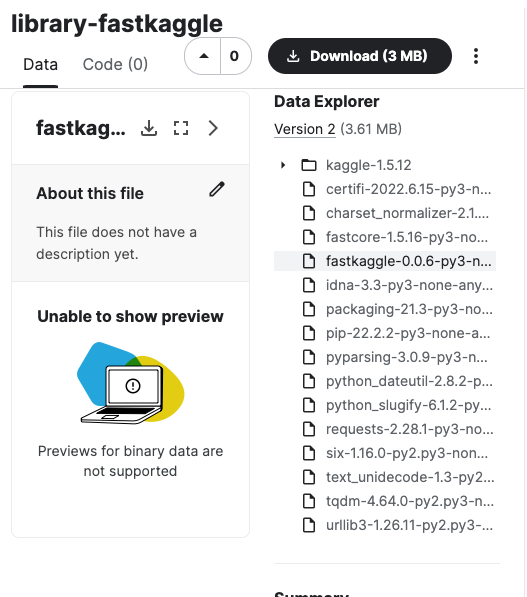
This creates datasets in kaggle with the needed files. For example the
library `fastkaggle` looks like this in kaggle.
Fastkaggle Dataset
#### requirements.txt
We can also create a singular dataset with multiple libraries based on a
`requirements.txt` file for the project. If there are any different
files it will push a new version.
``` python
create_requirements_dataset('test_files/requirements.txt',lib_path,'libraries-pawpularity', username)
```
Processing libraries-pawpularity at /root/kaggle_datasets/libraries-pawpularity
-----Downloading or Creating Dataset
Data package template written to: /root/kaggle_datasets/libraries-pawpularity/dataset-metadata.json
-----Checking dataset version against pip
-----Updating libraries-pawpularity in Kaggle
Complete
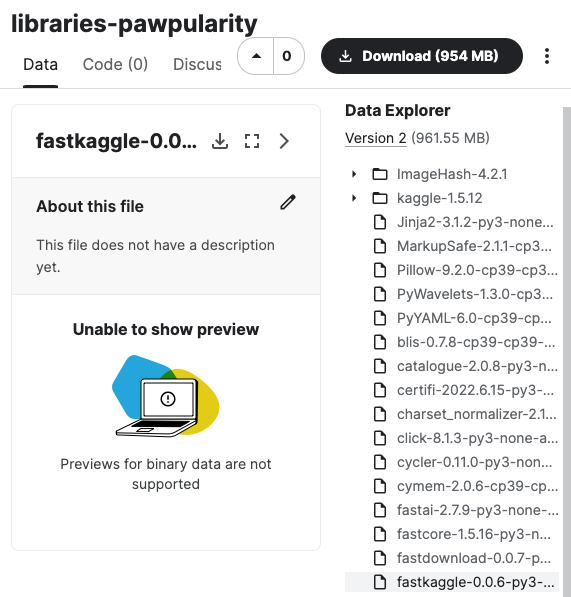
This creates a dataset in kaggle with the needed files.
Pawpularity Dataset